
How to top up
Every Pila account has its own dedicated account number. Transfer into it from your bank and the balance updates.1
Open Overview
The Account Details card sits on the right of the Overview page.
2
Copy the account details
You will see the bank name, account number and account name. The Copy button takes all three.
3
Transfer from your bank
Send money to that account as you would any other Nigerian transfer.
4
Watch the balance
Available Balance on Overview reflects the credit once it lands.
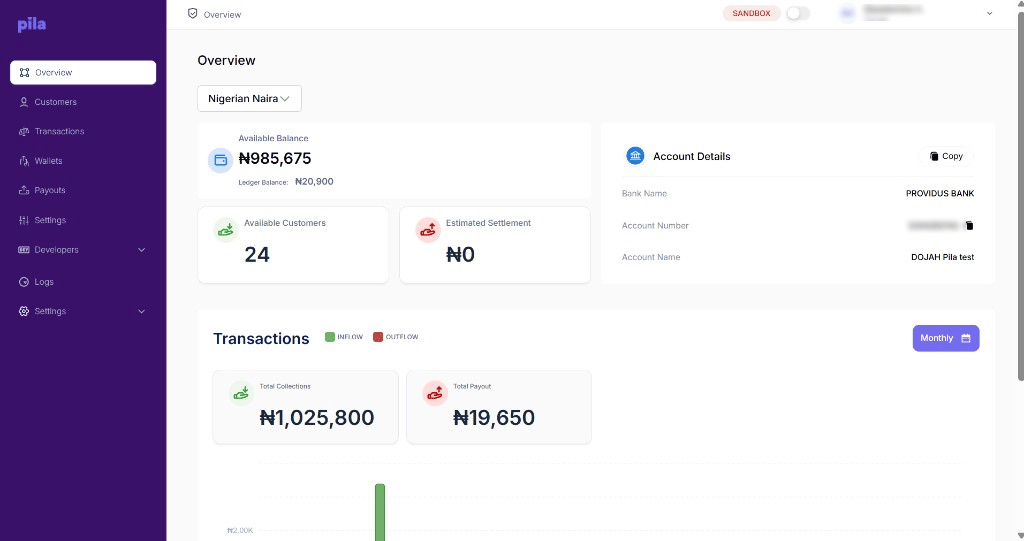
Available Balance and Account Details on the Overview page
Available balance is what you can spend right now. Ledger balance includes amounts that are recorded but not yet settled, so the two will differ while transactions are in flight.
Checking your balance from the API
This endpoint returns your current Pila balance — useful for a low-balance alert before payouts start failing.[GET]
Headers
Response
Next
Send a payout
Move money from your balance to any Nigerian bank.
Set your settlement account
Choose where collections settle to.