> ## Documentation Index
> Fetch the complete documentation index at: https://api-docs.trypila.co/llms.txt
> Use this file to discover all available pages before exploring further.
# Logs
> Who on your team did what in the dashboard, and which exports they ran.
Logs records what people on your team do in the dashboard, so you can see who viewed or changed what, and when. It has two tabs: **Audit Logs** and **Export Logs**.
## Audit logs
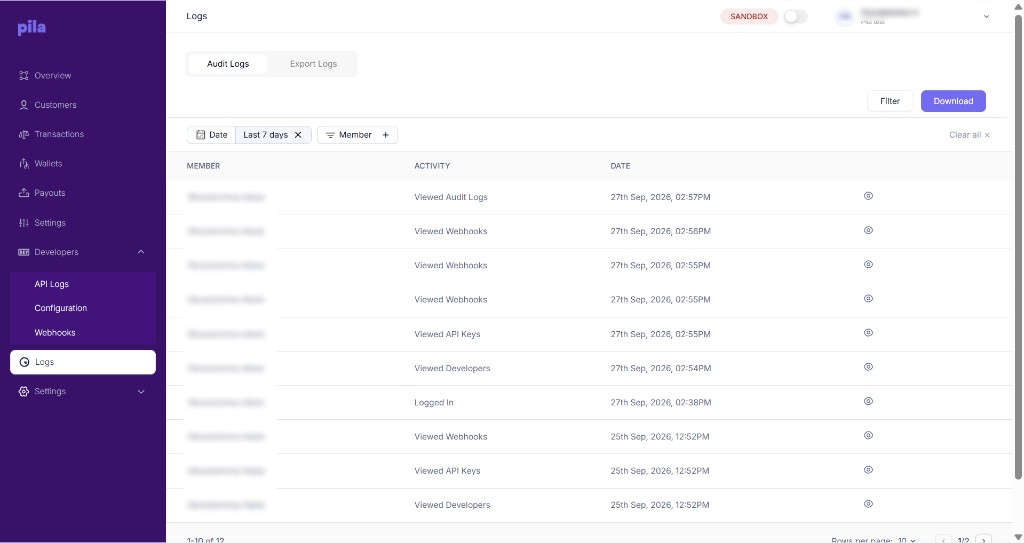 Each row shows the **member**, the **activity** (for example Logged In, Viewed API Keys, Viewed Webhooks) and the **date**. The list opens filtered to the **Last 7 days**.
Select **+** on the **Member** chip to see one person's activity, or change the **Date** range.
Select **Clear all** to remove every filter.
Select **Download** to save the log.
### Activity details
Select the eye icon on a row to see the device behind that activity.
Each row shows the **member**, the **activity** (for example Logged In, Viewed API Keys, Viewed Webhooks) and the **date**. The list opens filtered to the **Last 7 days**.
Select **+** on the **Member** chip to see one person's activity, or change the **Date** range.
Select **Clear all** to remove every filter.
Select **Download** to save the log.
### Activity details
Select the eye icon on a row to see the device behind that activity.
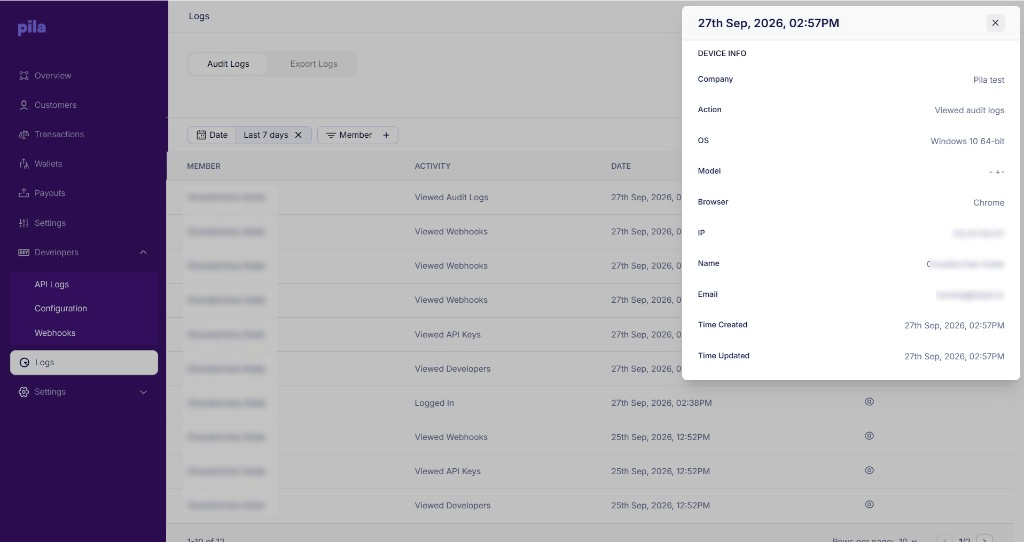 | Field | Meaning |
| - | - |
| **Company** | The business the action was taken in. |
| **Action** | What the member did. |
| **OS, Model, Browser** | The device and browser used. |
| **IP** | The IP address the action came from. |
| **Name, Email** | The team member who did it. |
| **Time Created, Time Updated** | When the entry was recorded. |
**Spotted something you don't recognise?** An unfamiliar IP address or device next to a login is a sign someone else may have your password. Change it under [Profile and security](/dashboard-guide/account/profile-security) and turn on 2FA.
Review audit logs after anyone leaves your team, and check that their access has actually been removed rather than just assuming it was.
## Export logs
The **Export Logs** tab records the exports your team has run from pages such as Transactions, Wallets and Payouts.
Exports contain customer names, account numbers and phone numbers. This tab is how you find out who pulled a file and when — worth checking periodically.
This documentation is built and hosted on [Mintlify](https://mintlify.com), a developer documentation platform.
| Field | Meaning |
| - | - |
| **Company** | The business the action was taken in. |
| **Action** | What the member did. |
| **OS, Model, Browser** | The device and browser used. |
| **IP** | The IP address the action came from. |
| **Name, Email** | The team member who did it. |
| **Time Created, Time Updated** | When the entry was recorded. |
**Spotted something you don't recognise?** An unfamiliar IP address or device next to a login is a sign someone else may have your password. Change it under [Profile and security](/dashboard-guide/account/profile-security) and turn on 2FA.
Review audit logs after anyone leaves your team, and check that their access has actually been removed rather than just assuming it was.
## Export logs
The **Export Logs** tab records the exports your team has run from pages such as Transactions, Wallets and Payouts.
Exports contain customer names, account numbers and phone numbers. This tab is how you find out who pulled a file and when — worth checking periodically.
This documentation is built and hosted on [Mintlify](https://mintlify.com), a developer documentation platform.