> ## Documentation Index
> Fetch the complete documentation index at: https://api-docs.trypila.co/llms.txt
> Use this file to discover all available pages before exploring further.
# Fund your wallet
> Top up the Pila balance that payouts, card loads and manual transfers settle from.
Your Pila wallet is the pool account behind your integration. Payouts, card funding and manual transfers all draw from it, so it needs a balance before anything can leave.
## How to top up
Every Pila account has its own dedicated account number. Transfer into it from your bank and the balance updates.
The **Account Details** card sits on the right of the [Overview](/dashboard-guide/home/overview) page.
You will see the bank name, account number and account name. The **Copy** button takes all three.
Send money to that account as you would any other Nigerian transfer.
**Available Balance** on Overview reflects the credit once it lands.
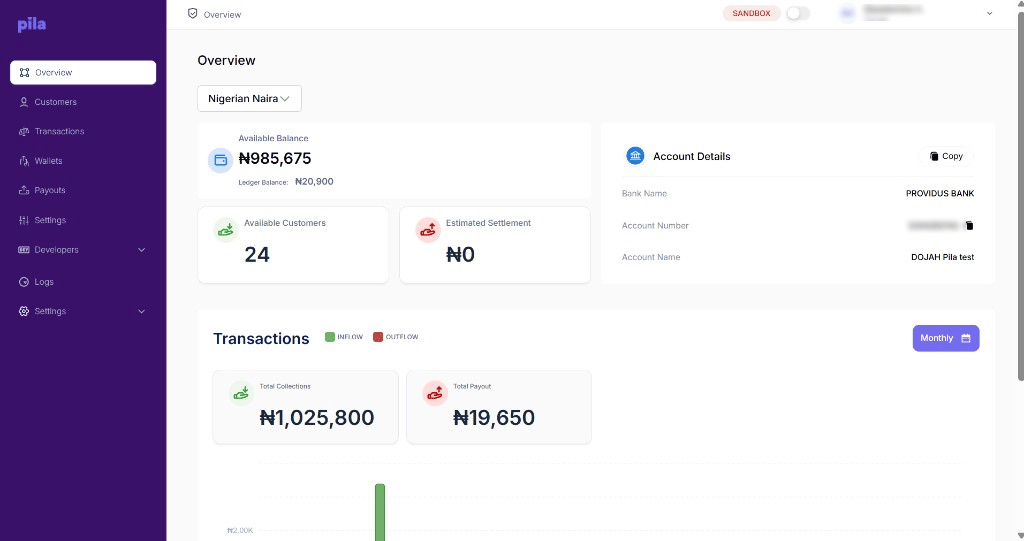 **Available balance** is what you can spend right now. **Ledger balance** includes amounts that are recorded but not yet settled, so the two will differ while transactions are in flight.
Funding in sandbox does not move real money, and sandbox balances have no bearing on live. Fund the live environment separately before you go into production.
## Checking your balance from the API
This endpoint returns your current Pila balance — useful for a low-balance alert before payouts start failing.
```http [GET] theme={null}
{{baseUrl}}/api/v1/balance
```
### Headers
| Header | Type | Description |
| - | - | - |
| `AppId` | string | Your app's ID, from [Developers → Configuration](https://dashboard.trypila.co/developers/configuration) |
| `Authorization` | string | Your private key for the environment |
```json Response theme={null}
{
"entity": {
"wallet_balance": "550.50"
}
}
```
Poll this on a schedule and alert your team when it drops below a threshold that covers a day of payouts. A failed disbursement run is much more expensive than a top-up.
## Next
Move money from your balance to any Nigerian bank.
Choose where collections settle to.
This documentation is built and hosted on [Mintlify](https://mintlify.com), a developer documentation platform.
**Available balance** is what you can spend right now. **Ledger balance** includes amounts that are recorded but not yet settled, so the two will differ while transactions are in flight.
Funding in sandbox does not move real money, and sandbox balances have no bearing on live. Fund the live environment separately before you go into production.
## Checking your balance from the API
This endpoint returns your current Pila balance — useful for a low-balance alert before payouts start failing.
```http [GET] theme={null}
{{baseUrl}}/api/v1/balance
```
### Headers
| Header | Type | Description |
| - | - | - |
| `AppId` | string | Your app's ID, from [Developers → Configuration](https://dashboard.trypila.co/developers/configuration) |
| `Authorization` | string | Your private key for the environment |
```json Response theme={null}
{
"entity": {
"wallet_balance": "550.50"
}
}
```
Poll this on a schedule and alert your team when it drops below a threshold that covers a day of payouts. A failed disbursement run is much more expensive than a top-up.
## Next
Move money from your balance to any Nigerian bank.
Choose where collections settle to.
This documentation is built and hosted on [Mintlify](https://mintlify.com), a developer documentation platform.