> ## Documentation Index
> Fetch the complete documentation index at: https://api-docs.trypila.co/llms.txt
> Use this file to discover all available pages before exploring further.
# Webhooks
> Subscribe your server to Pila events, send test deliveries, and check what was delivered.
Webhooks let Pila notify your server when something happens, such as a wallet being credited, so you don't have to keep polling the API.
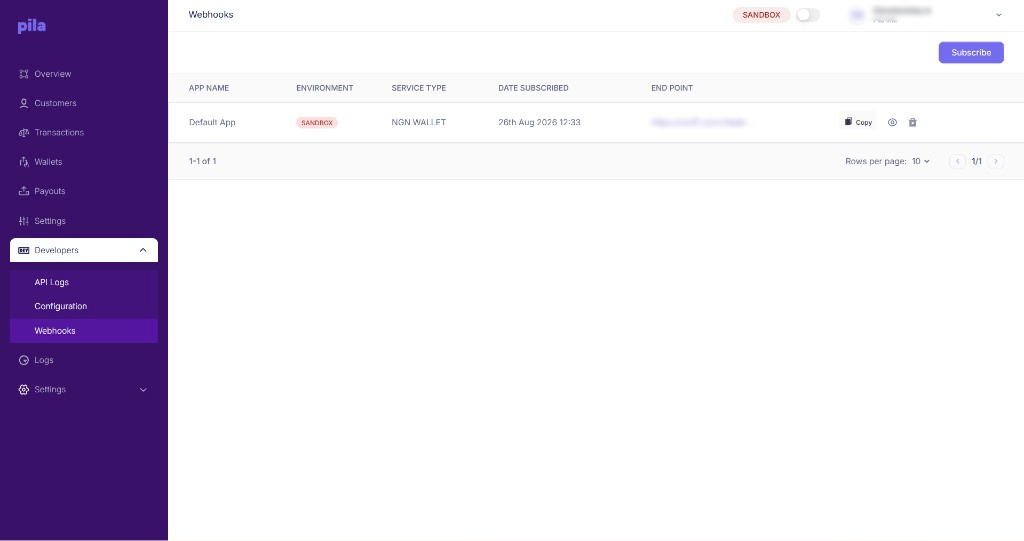 The list shows each subscription's **app name**, **environment**, **service type** (for example `NGN WALLET`), **date subscribed** and **endpoint**.
## Subscribe
At the top right of the Webhooks page.
Pick which app and which service you want events for, and enter your endpoint URL.
The subscription appears in the list.
On each row, **Copy** copies the endpoint URL, the eye icon opens its details, and the bin icon removes the subscription.
Subscriptions are per mode. Sandbox hooks do not carry over to live — re-subscribe after you switch the top-bar toggle.
You can also register an endpoint from the API. See [Subscribe to webhooks](/api-reference/webhooks/subscribe).
## Webhook details and deliveries
The list shows each subscription's **app name**, **environment**, **service type** (for example `NGN WALLET`), **date subscribed** and **endpoint**.
## Subscribe
At the top right of the Webhooks page.
Pick which app and which service you want events for, and enter your endpoint URL.
The subscription appears in the list.
On each row, **Copy** copies the endpoint URL, the eye icon opens its details, and the bin icon removes the subscription.
Subscriptions are per mode. Sandbox hooks do not carry over to live — re-subscribe after you switch the top-bar toggle.
You can also register an endpoint from the API. See [Subscribe to webhooks](/api-reference/webhooks/subscribe).
## Webhook details and deliveries
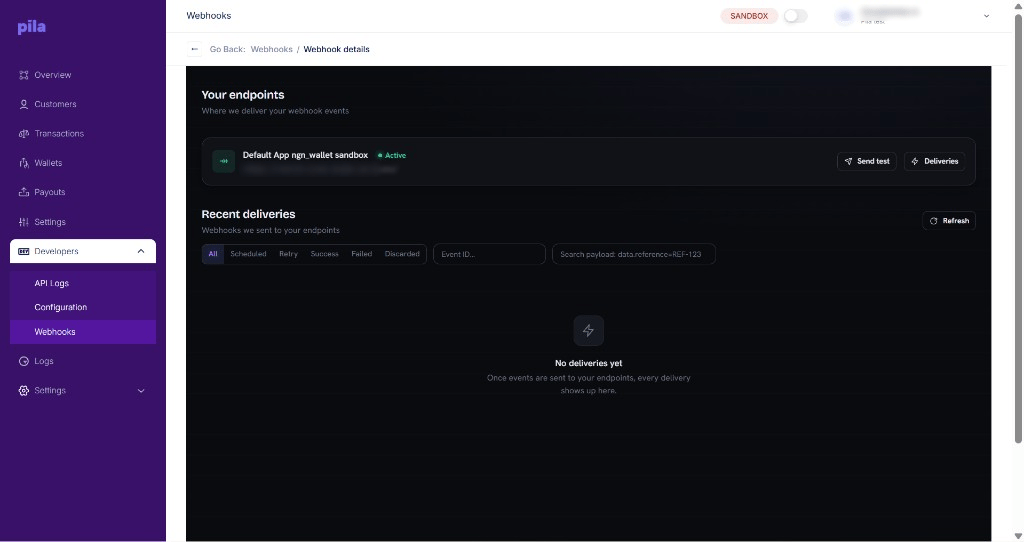 **Your endpoints** shows where Pila delivers events and whether each endpoint is **Active**.
* **Send test** sends a test event so you can check your server receives it.
* **Deliveries** opens the delivery history for that endpoint.
**Recent deliveries** lists every webhook sent to your endpoints. Filter by **All**, **Scheduled**, **Retry**, **Success**, **Failed** or **Discarded**. Search by **Event ID**, or search the payload with a field and value such as `data.reference=REF-123`. Select **Refresh** to load new deliveries, and **Go Back** to return to the list.
## Building a reliable endpoint
Check the `x-pila-signature` header before acting on a payload. An unverified webhook is untrusted input, and a forged deposit event your code trusts is a direct path to losing money. See [Webhook signatures](/api-reference/core-concepts/webhook-signatures).
Acknowledge first, process in the background. A slow endpoint looks like a failed one and will show up under Retry.
The same event can arrive more than once. Key your processing on the transaction or event identifier so a repeat delivery is a no-op.
A localhost URL will not receive anything. Use a tunnel while developing.
Not receiving events? Open the webhook's details, select **Send test**, then check **Recent deliveries** for `Failed` or `Retry` entries — they will tell you whether Pila reached you at all.
This documentation is built and hosted on [Mintlify](https://mintlify.com), a developer documentation platform.
**Your endpoints** shows where Pila delivers events and whether each endpoint is **Active**.
* **Send test** sends a test event so you can check your server receives it.
* **Deliveries** opens the delivery history for that endpoint.
**Recent deliveries** lists every webhook sent to your endpoints. Filter by **All**, **Scheduled**, **Retry**, **Success**, **Failed** or **Discarded**. Search by **Event ID**, or search the payload with a field and value such as `data.reference=REF-123`. Select **Refresh** to load new deliveries, and **Go Back** to return to the list.
## Building a reliable endpoint
Check the `x-pila-signature` header before acting on a payload. An unverified webhook is untrusted input, and a forged deposit event your code trusts is a direct path to losing money. See [Webhook signatures](/api-reference/core-concepts/webhook-signatures).
Acknowledge first, process in the background. A slow endpoint looks like a failed one and will show up under Retry.
The same event can arrive more than once. Key your processing on the transaction or event identifier so a repeat delivery is a no-op.
A localhost URL will not receive anything. Use a tunnel while developing.
Not receiving events? Open the webhook's details, select **Send test**, then check **Recent deliveries** for `Failed` or `Retry` entries — they will tell you whether Pila reached you at all.
This documentation is built and hosted on [Mintlify](https://mintlify.com), a developer documentation platform.