> ## Documentation Index
> Fetch the complete documentation index at: https://api-docs.trypila.co/llms.txt
> Use this file to discover all available pages before exploring further.
# Configuration: API keys and apps
> Your public and private keys, and the apps your integration runs under.
The **Developers** menu is for your technical team. It holds your API keys and apps, your webhook subscriptions, and a log of every API call.
Everything under Developers is per mode. Sandbox and live each have their own keys, apps and webhooks.
 ## API keys
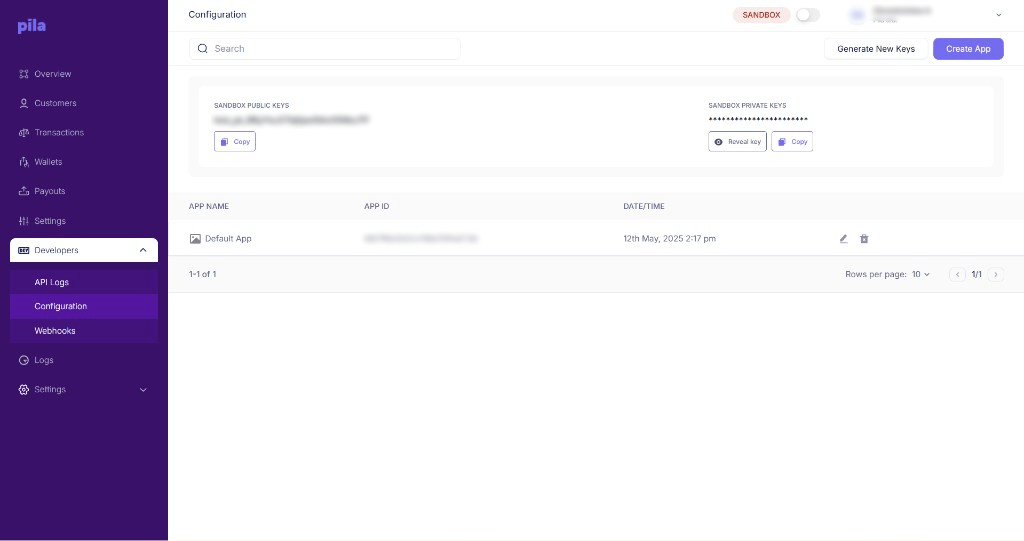
The top card shows your **public key** and **private key** for the current mode. Sandbox public keys start with `test_pk_`.
* Select **Copy** under a key to copy it.
* The private key is hidden. Select **Reveal key** to show it, or **Copy** to copy it without showing it.
* Select **Generate New Keys** to replace your keys. Update your integration straight away, because calls using the old keys will stop working.
**Keep your private key secret.** Use it only on your server. Never put it in a mobile app, website code or a shared document. If you think it has leaked, select **Generate New Keys** and update your integration.
Deploy the new key value before you regenerate, or plan for a short window of failing calls — rotation takes effect immediately.
## Apps
Below the keys, the apps table lists each app with its **app name**, **app ID** and **date/time** created. Every business starts with a **Default App**.
Select **Create App** — for example, one per product you run.
Use the pencil icon to rename an app, or the bin icon to delete it.
The **app ID** is what you send in the `AppId` header on every request. See [Authentication](/api-reference/get-started/authentication).
## Next
Have Pila notify your server when money moves.
Every call your apps have made.
This documentation is built and hosted on [Mintlify](https://mintlify.com), a developer documentation platform.
## API keys
The top card shows your **public key** and **private key** for the current mode. Sandbox public keys start with `test_pk_`.
* Select **Copy** under a key to copy it.
* The private key is hidden. Select **Reveal key** to show it, or **Copy** to copy it without showing it.
* Select **Generate New Keys** to replace your keys. Update your integration straight away, because calls using the old keys will stop working.
**Keep your private key secret.** Use it only on your server. Never put it in a mobile app, website code or a shared document. If you think it has leaked, select **Generate New Keys** and update your integration.
Deploy the new key value before you regenerate, or plan for a short window of failing calls — rotation takes effect immediately.
## Apps
Below the keys, the apps table lists each app with its **app name**, **app ID** and **date/time** created. Every business starts with a **Default App**.
Select **Create App** — for example, one per product you run.
Use the pencil icon to rename an app, or the bin icon to delete it.
The **app ID** is what you send in the `AppId` header on every request. See [Authentication](/api-reference/get-started/authentication).
## Next
Have Pila notify your server when money moves.
Every call your apps have made.
This documentation is built and hosted on [Mintlify](https://mintlify.com), a developer documentation platform.