> ## Documentation Index
> Fetch the complete documentation index at: https://api-docs.trypila.co/llms.txt
> Use this file to discover all available pages before exploring further.
# Company verification
> The two steps you complete before you can use the live environment.
You need to complete two steps before you can use the live environment. Both must be done by your company's authorised signatory.
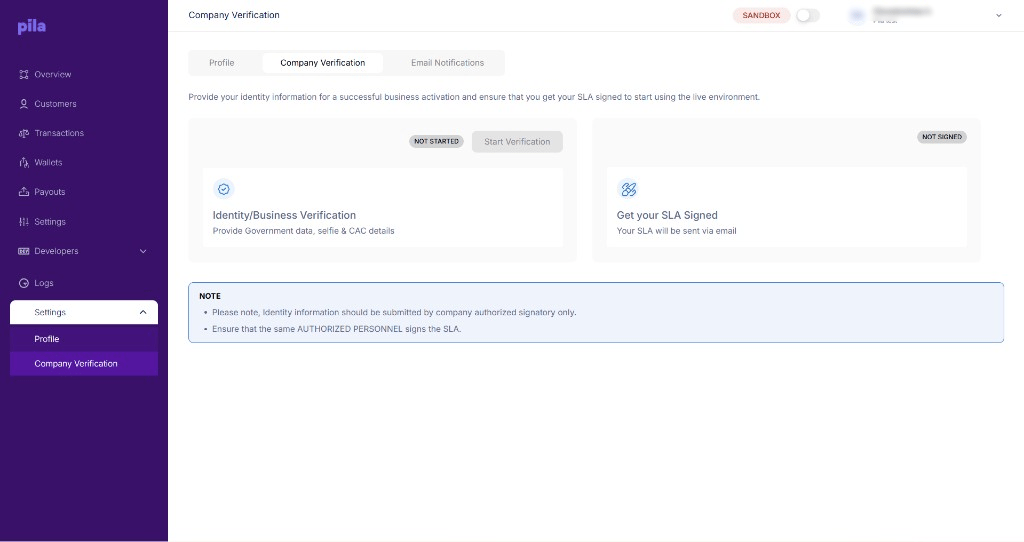 | Step | What you provide | Status shown |
| - | - | - |
| **Identity/Business Verification** | Government ID data, a selfie and your CAC details. | `NOT STARTED` until you begin. |
| **Get your SLA Signed** | Your signature on Pila's service level agreement, sent to you by email. | `NOT SIGNED` until it is signed. |
## How to complete it
From **Settings** at the bottom of the sidebar.
Select **Start Verification** and submit the signatory's government data, selfie and CAC details.
Watch your inbox for the SLA and have the same signatory sign it.
When both steps are complete, switch the top bar to live.
**Use the same person throughout.** Identity information must come from the company's authorised signatory, and the same authorised person must sign the SLA.
## After you go live
Going live changes more than the badge in the top bar.
Live keys are separate from sandbox keys. See [Environments](/api-reference/get-started/environments).
Sandbox subscriptions do not carry over. See [Webhooks](/dashboard-guide/developers/webhooks).
Live payouts settle from real funds. See [Fund your wallet](/dashboard-guide/getting-started/fund-your-wallet).
See [Business settings](/dashboard-guide/home/settings).
This documentation is built and hosted on [Mintlify](https://mintlify.com), a developer documentation platform.
| Step | What you provide | Status shown |
| - | - | - |
| **Identity/Business Verification** | Government ID data, a selfie and your CAC details. | `NOT STARTED` until you begin. |
| **Get your SLA Signed** | Your signature on Pila's service level agreement, sent to you by email. | `NOT SIGNED` until it is signed. |
## How to complete it
From **Settings** at the bottom of the sidebar.
Select **Start Verification** and submit the signatory's government data, selfie and CAC details.
Watch your inbox for the SLA and have the same signatory sign it.
When both steps are complete, switch the top bar to live.
**Use the same person throughout.** Identity information must come from the company's authorised signatory, and the same authorised person must sign the SLA.
## After you go live
Going live changes more than the badge in the top bar.
Live keys are separate from sandbox keys. See [Environments](/api-reference/get-started/environments).
Sandbox subscriptions do not carry over. See [Webhooks](/dashboard-guide/developers/webhooks).
Live payouts settle from real funds. See [Fund your wallet](/dashboard-guide/getting-started/fund-your-wallet).
See [Business settings](/dashboard-guide/home/settings).
This documentation is built and hosted on [Mintlify](https://mintlify.com), a developer documentation platform.