> ## Documentation Index
> Fetch the complete documentation index at: https://api-docs.trypila.co/llms.txt
> Use this file to discover all available pages before exploring further.
# Authentication
> Every Pila request is authenticated with your app's secret key and its application ID.
Pila authenticates each request with two headers. There are no sessions, tokens to refresh, or OAuth flows — you send the same pair of headers every time.
| Header | Value |
| - | - |
| `Authorization` | Your **private (secret) key** for the environment you are calling |
| `AppId` | The **application ID** of the app the request belongs to |
Requests that send `Content-Type: application/json` bodies also need that header, as usual.
```bash Example request theme={null}
curl "https://sandbox.trypila.co/api/v1/general/banks" \
-H "Authorization: $PILA_SECRET_KEY" \
-H "AppId: $PILA_APP_ID"
```
## Finding your keys
Your keys live under **Developers → Configuration** in the dashboard. Each app has a separate sandbox and live pair, and you can regenerate either at any time.
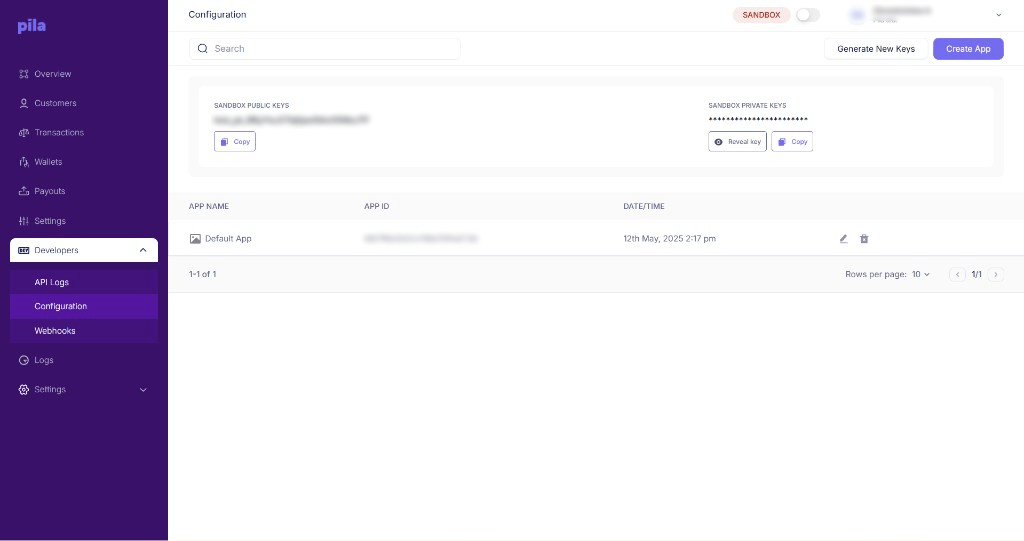 The key you pass in `Authorization` is the **private key** for the environment you are hitting. A sandbox key will not authenticate against `api.trypila.co`, and vice versa.
## Setting it up in Postman
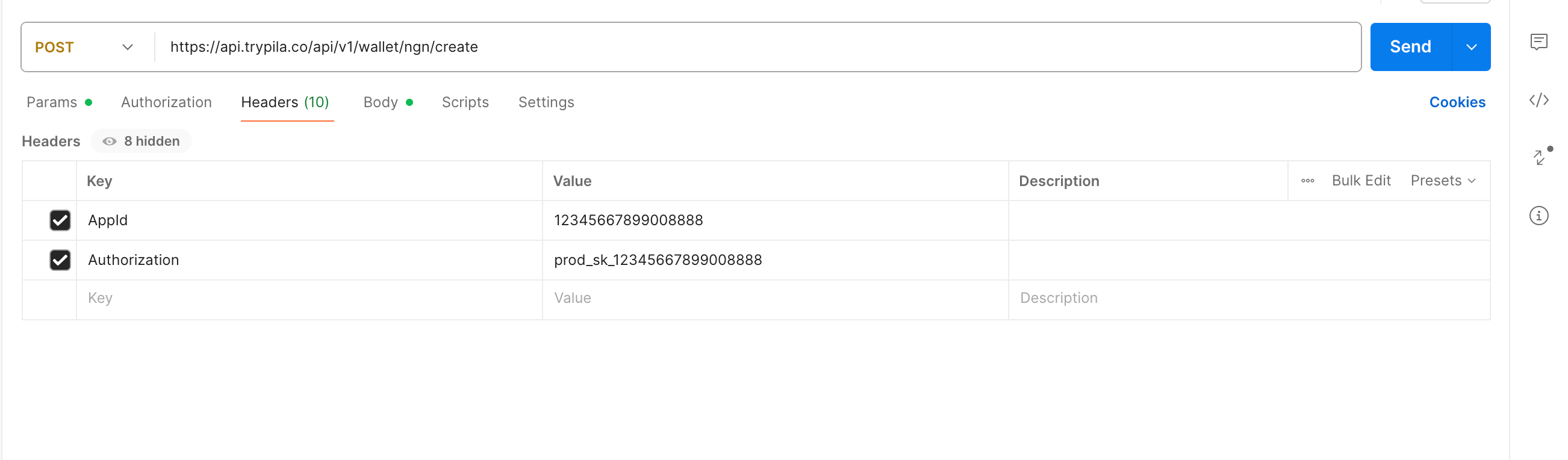
Add both values as headers on the request — `Authorization` with your private key and `AppId` with the application ID.
The key you pass in `Authorization` is the **private key** for the environment you are hitting. A sandbox key will not authenticate against `api.trypila.co`, and vice versa.
## Setting it up in Postman
Add both values as headers on the request — `Authorization` with your private key and `AppId` with the application ID.
 ## Base URLs
Every request must include a base URL, and every request must be made over HTTPS.
| Environment | Base URL |
| - | - |
| Sandbox | `https://sandbox.trypila.co` |
| Live | `https://api.trypila.co` |
See [Environments](/api-reference/get-started/environments) for what differs between the two.
## Keeping keys safe
**Never share or publish your secret key.** Treat it the way you would a database password.
Read keys from environment variables or a secrets manager at runtime.
Call Pila from your backend only. A key shipped in a mobile app or browser bundle is a key that has leaked.
Use separate apps for separate products or environments so you can rotate one without taking everything down.
Regenerate immediately from **Developers → Configuration** if a key is ever exposed — in a commit, a log, a screenshot or a support ticket.
## Troubleshooting
Check that you are sending **both** headers. `AppId` is required alongside `Authorization`; sending only the key will fail.
You are probably still sending the sandbox key, or your account has not been verified for live access yet. Both the base URL and the key have to change together.
Someone may have regenerated the key from the dashboard. Copy the current value from **Developers → Configuration** and redeploy.
This documentation is built and hosted on [Mintlify](https://mintlify.com), a developer documentation platform.
## Base URLs
Every request must include a base URL, and every request must be made over HTTPS.
| Environment | Base URL |
| - | - |
| Sandbox | `https://sandbox.trypila.co` |
| Live | `https://api.trypila.co` |
See [Environments](/api-reference/get-started/environments) for what differs between the two.
## Keeping keys safe
**Never share or publish your secret key.** Treat it the way you would a database password.
Read keys from environment variables or a secrets manager at runtime.
Call Pila from your backend only. A key shipped in a mobile app or browser bundle is a key that has leaked.
Use separate apps for separate products or environments so you can rotate one without taking everything down.
Regenerate immediately from **Developers → Configuration** if a key is ever exposed — in a commit, a log, a screenshot or a support ticket.
## Troubleshooting
Check that you are sending **both** headers. `AppId` is required alongside `Authorization`; sending only the key will fail.
You are probably still sending the sandbox key, or your account has not been verified for live access yet. Both the base URL and the key have to change together.
Someone may have regenerated the key from the dashboard. Copy the current value from **Developers → Configuration** and redeploy.
This documentation is built and hosted on [Mintlify](https://mintlify.com), a developer documentation platform.